
Creating MCP Servers in Rust
A journey of how I created an MCP Server in Rust and the road blocks I had along the wayrust mcp crdt 2026-02-01
MCP servers are useful tools that allow AI agents the ability to interact with applications in a prescribed fashion. I wanted to understand how they put together so I could work out where/how they are useful.
One of the things I found when first investigating them, is that there aren't that many MCP servers that are written in rust, most are either NodeJS or Python. So this is my journey of how I went about creating todo-mcp: a rust based todo list MCP server, with local state synchronisation and desktop/android app.
Todo MCP is open source, and available at https://github.com/cetra3/todo-mcp
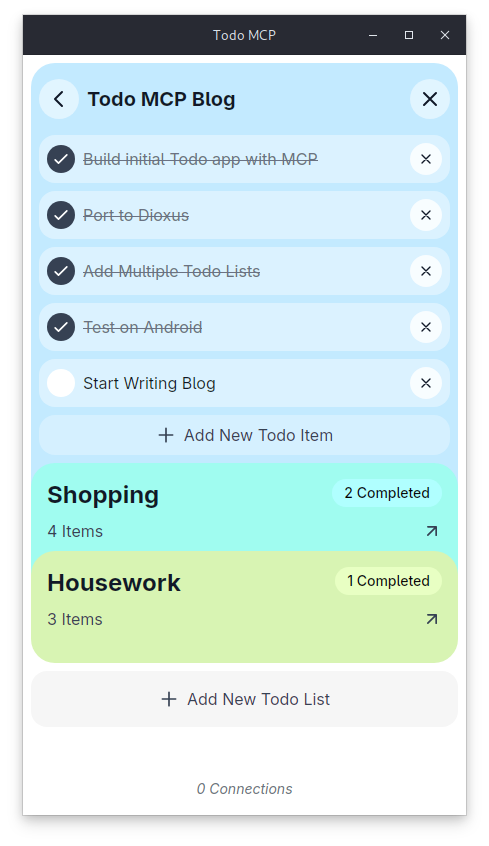
MCP Servers and Requirements
The very first challenge I ran into was that, if you have a number of agent windows open, they will all spawn separate MCP processes. If you are integrating with a remote web server, this isn't much of an issue, as they will be essentially wrappers over API calls to a service that can handle multiple clients.
However, if you wanted a more "local-first" approach, this becomes a little hard without some state synchronisation between processes. There isn't any central server to ask state for, and more often than not, when I think of a todo to write, I don't want to have to be at home, or even connected to any network.
I also wanted to have a "companion app" open so that I could see my todo lists without having to use an MCP server at all, and mobile support, so I could use it when I am out of the house.
I had experimented already with automerge and its associated API in mpad to make a multiplayer text pad, and thought it would be a good fit for this project. We could use the same strategy here: use automerge CRDTs and persist to disk periodically and then when another connection to another process is made (either on the same device or on another device), then it could reconcile changes made, and update the state accordingly.
Automerge and CRDTs
Automerge uses Conflict-free Replicated Data Types (CRDTs) to ensure data synchronisation without a central authority. A CRDT is a data structure that will ensure "eventual consistency" to state, with some smarts around merging multiple disparate sources.
An example of a CRDT (one of the more simpler ones) is a Grow Only set. Say you have two separate processes that have a set of values that are shared:
Process A has:
- Value AProcess B has:
- Value B
- Value C
To merge/reconcile this, you can see the obvious choice is:
- Value A
- Value B
- Value C
The most important thing is that the output state converges. If Process A sends an update before Process B, or vice versa, the result is the same. This type of CRDT, however, is quite simplistic, and doesn't allow you to do more complex state changes. You can imagine an extension to this would be to add another set for "removed" values, so you could remove the values from the set.
I.e, if starting from the last merge an update is sent like:
Remove:
- Value B
Then the state is:
Added:
- Value A
- Value B
- Value C

Removed:
- Value B
& the merged state is:
- Value A
- Value C
This is sometimes called a Two Phase Set. It allows you to add & remove values from a set, but once a value is removed, it can't be re-added back.
To extend this again to allow items to be added/removed multiple times, you could add a timestamp to each of the values, when they were added or removed, and they are added/removed based upon which set the value is in, and the newest timestamp (AKA Last Write Wins).
You can see as this gets more complex, a lot of bookkeeping is required.
For different types of data, like text, lists, objects, there are a number of different types of CRDTs available, that can sometimes be composed together to create complex state shapes. That's where automerge comes in.
automerge provides a number of CRDTs you can use to build out your state:
- Composite nested CRDTs such as lists, objects and text
- Primitive CRDTs such as counters, numbers, booleans
Autosurgeon
CRDTs are a good tool to use, and automerge provides some great foundations for using them. However, like manually writing JSON structures is a pain, and we derive with serde most of the time, we can use autosurgeon to automatically derive a rust structure, converting it into something that can be used with automerge CRDTs
So for a todo like structure, we can write:
use autosurgeon::{Reconcile, Hydrate};

#[derive(Reconcile, Hydrate)]
struct TodoList {
  todos: Vec<Todo>
}

#[derive(Reconcile, Hydrate)]
struct Todo {
    title: String,
    completed: bool
}
And use the hydrate/reconcile methods in autosurgeon to manage state changes for us.
This is not without challenges, however, and seeding new processes can be tricky. When writing mpad I encountered a bit of an issue around this, which has not been resolved as of this blog. However I have managed to work around it for now.
Sending State via Multicast
I elected to use Multicast to send state changes to other instances. Multicast is (normally) a LAN protocol, that allows 1 or more processes the ability to register for packets to the same IP address/Port combo (Within the specific Multicast IP range of 224.0.0.0/4).
With a bit of setup when creating a UDP socket, you can retrieve packets destined to the ip/port pairing. The OS will send an IGMP group request, which hopefully your router/switch will respect, and start sending packets to your socket. Sending packets is pretty easy, you just send them to the same ip/port as things are listening.
However, UDP does not have the same guarantees as TCP, and with multicast TCP can't be used.
Simple Multicast Protocol
I've elected to create a pretty bare-bones protocol for use with UDP for sending packets from "sites" (i.e, instances of a process). Essentially, given any payload to send over the network it will:
- Chunk it down to fit into the standard Ethernet MTU (which is normally 1500 bytes but I capped it 1400 for a bit of headroom)
- Send the site id, which is randomly generated by each process on startup, I could use the sender ip/port but that doesn't deal with reconnections/network changes.
- Send a sequence number, the current payload number being sent
- Send a total length of the sequence
num, which is how many packets will be sent for this payload - Send an index number (what packet number this is for the given sequence)
- Finally the payload
With this we have semi-reliable network communications. It hasn't been widely tested with packet loss etc.. but it's enough to get started. Some improvements in the future we could do NACK style handling, whereby if we missed a sequence, we can request the full state from that site etc.. but for now this was enough to work reliably well in testing. Already when a "site" reconnects due to network changes, it resends its full state for reconciliation each time in the first message.
Choosing a GUI Framework
One design decision I made was that I wanted a little companion app around seeing and interacting with Todos. I also wanted support for using it on my android phone, so a cross platform UI was necessary.
Slint: The First Attempt
Slint is a rust first cross platform GUI framework with some nice editor plugins and some good primitives to get you started.
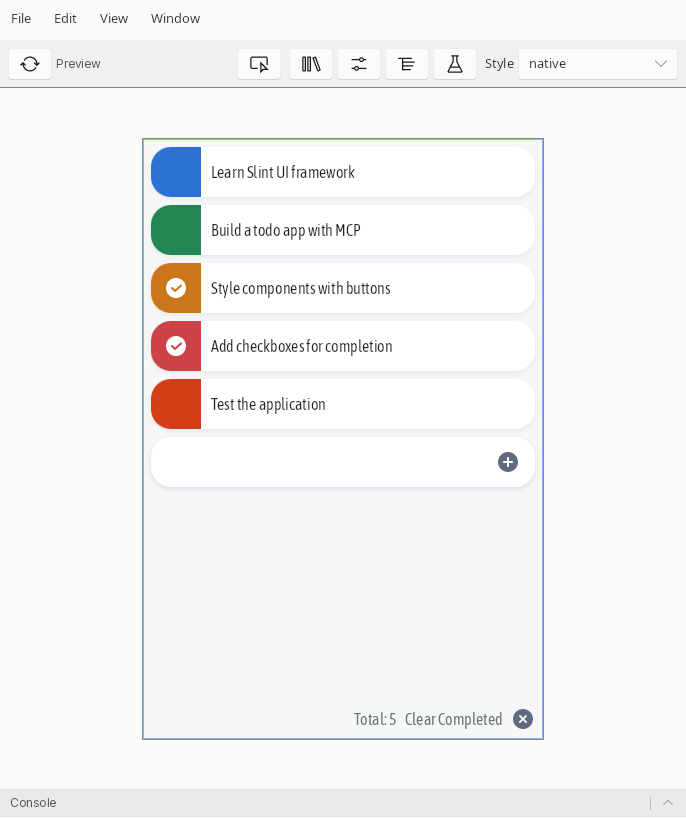
I wrote an initial version using slint, and was happy with how lightweight it was and would still consider it for new projects. However I ran into two bugs when doing some lightweight QA:
Undo/Redo functionality did not update the TextInput, so there was no real way to get the text from the GUI and feed it into my CRDT: https://github.com/slint-ui/slint/issues/9205. For this one I raised a PR and got it fixed.
Text Editing on Android was not working. With garbled text and other weirdness: https://github.com/slint-ui/slint/issues/9240. Turns out because I wasn't using the standard android keyboard, this caused issues. I tried a good half a day to try and fix this, by looking at the companion Java helper that is used to manage inputs, but gave up in the end.
While I still think Slint is perfect for this, these issues made it seem like a bit of an uphill battle to implement something pretty simple. Most of the guts of this application isn't in UI, so I can swap it out for any frame work. So for now, I moved onto something I had been meaning to try for a while: Dioxus.
Dioxus: Embracing Webview
Dioxus is cross platform, but it is not native, rather it uses a webview to display the UI. There are some great time savers like hot reloading, and support for Tailwind CSS is pretty easy. Plus, I have coded enough websites to understand the quirks of that ecosystem enough to know I could get myself out of trouble. It took me far less time to get things up and running, and initial testing showed that there weren't any major flaws.
One feature I added immediately was the ability to have multiple todo lists in a collapsible fashion:
The one downside is memory usage: it is essentially embedding a full browser on Desktop and so uses a lot more RAM and resources. There are some potential avenues for addressing this, such as an experimental native renderer in the works, so hopefully this will be a good solution in the future.
MCP Server Libraries
There is first class support for rust MCP servers via the rmcp crate. However, this was also not without issues. When running an MCP process within Zed, it failed to run. Turns out that some of the schema definitions were wrong and didn't match the spec. I raised a PR and got this fixed as well: https://github.com/modelcontextprotocol/rust-sdk/pull/377
With rmcp you can use derive macros to build your MCP server:
#[tool_router]
impl TodoMcp {
    ...

    #[tool(description = "Get all todo lists")]
    async fn get_todos(
        &self,
        Parameters(params): Parameters<GetListParams>,
    ) -> Result<Json<TodoListsResponse>, McpError> {
        let state = self.todo_state.read()?;
        let response: TodoListsResponse = (&*state).into();

        Ok(Json(response))
    }

    ...
Then serving it is pretty easy (I only use stdio mode for MCPs):
pub async fn run_mcp() -> Result<(), Error> {
    let todo_mcp = TodoMcp::new().serve(stdio()).await?;

    todo_mcp.waiting().await?;

    Ok(())
}
Claude Code Hook Integration
With Claude Code, while you can instrument an MCP server and run it, I wanted it to feel a little more "native" in that whenever there was a todo list in any agent session, I wanted that to be published. That way I could open my companion app on my phone, or desktop, and watch the todo list updates in real time. I could go make a coffee and wait for the todos to be completed before checking back in.
To accomplish that, I made a small integration with Claude Code's hook system:
Because hooks execute a command (like a bash command) and exit, I wanted this to be pretty dumb and simple:
- Receive the hook JSON from stdin
- Reconcile the todo list & work out a good name
- Add/Update the todo in the list when things happen in claude
Then I can add this to ~/.claude/settings.json to have it invoked:
{
  "hooks": {
    "PostToolUse": [
      {
        "matcher": "TaskCreate|TaskUpdate",
        "hooks": [
          {
            "type": "command",
            "command": "todo-mcp hook"
          }
        ]
      }
    ]
  }
}
This mostly works, but needs a bit more testing. The one thing is that it's hard to get a nice name for a "claude session" without a bit of song and dance, and so I have elected just to include the current working dir as a title of the list.
The other problem was sometimes Claude skips creating todos and essentially adds them completed. So for this I revert back to reading it from the todo structure in ~/.claude/todos/ which seems to work and allows me to reconcile changes.
Obviously a bit more testing is still needed, as I have sometimes seen it not act the way I want, and sometimes claude does not even create todo lists at all, so it's currently an open question how to address that.
Dealing with Network Changes
When testing out this app with my phone, I went shopping and marked off my shopping on the list as I went around the store. When I got home, I noticed that the list was now out of sync, and I had to restart the app to get things going again. Not an ideal situation.
What I wanted to happen was that when a network changed, I wanted to restart the multicast protocol tasks in a way that allowed me to reconcile when I came back home.
So I found the great netwatcher crate, that allows me to register a callback to fire whenever there are any network changes. This required a bit of re-architecting and decoupling of the multicast socket to the state of the app, so that we are able to continue off where we left.
While it is cross platform, I had to end up creating a custom AndroidManifest.xml for the extra ACCESS_NETWORK_STATE permission, which isn't included in dioxus by default.
Then it was a matter of testing it. For desktop I just turned on/off the wifi with iwctl which would allow me to simulate network failures. And for android, I could just enable/disable wifi from settings.
However, with android there is a state where your app is loaded, but it isn't currently on screen. In this state, the app will continue to run, but can't use any network sockets, returning a "permission denied" error. To work around this, I simply retry connecting every 10 seconds or so. However, there is probably a better solution, but requires a bit more investigation. I am hopeful that in newer versions of Dioxus, this will be made a lot easier, and so I'm waiting for 0.8 to see if there is an easy solution to solve it.
Claude Code and Frustration Driven Development
I wanted to give Claude Code a good rinse out when making this project. A lot of the discourse around AI is extremely positive, or entirely negative, there doesn't seem to be as much nuance. So while I started with a base that I wrote, when adding new features and testing ideas I first prompted claude to help plan out and implement them.
9 times out of 10, unless it was a simple change, I found the code that it wrote was both alien and hard to follow. If this was another colleague's PR I would sit down and work with them together to get it to a good state. But with Claude you can't do that, it never learns above the baseline, and when that context window blows out, or a new session is created, we're back to square one.
It felt like, when reading Claude code changes, the entire thing was a giant code smell. It's hard to put my finger on why it was bad, it just didn't seem like it was idiomatic, electing to take shortcuts and otherwise not understand the context of what was happening. This gets compounded the more features and complexity your application has. For small things, like writing tests, and doing small refactors, this was great, but for bigger things it fell down pretty quickly.
So what I ended up doing is something I am coining Frustration Driven Development or FDD for short. This is when you have code that is written, that does what you want, just not in an ideal fashion, and so out of frustration, you rewrite it completely.
There are sections of code I haven't adjusted much from Claude's initial output, and reviewing some of the source code of the initial release I can already see changes/cleanup I'd like to make. Since this is a bit of a hobby project, I don't have much time to dedicate to making this pristine and in a state that I would be proud of.
So I guess that's a small win for AI: I don't know if I would've finished it in this state without using Claude Code. I hope that when I do get round to it, I can use some FDD to help work through some of it.
Wrapping Up
Todo MCP was a lot of fun to write and I have been using it as my daily driver currently, replacing google keep for my todo lists. I actually end up using it more for the todo functionality rather than MCP/Claude integrations, so it's sort of evolved into something more than just an MCP server in my eyes.
There were a few learnings around writing an application like this in rust, and I feel that the ecosystem around this is still very green (i.e, slint text issues & rmcp not working with zed at all). I had to raise a few PRs and a few issues to get to where I am at, and there is still lots of missing documentation/ways to do things. I'm hopeful though that in the ensuing months/years, this will not be as big of an issue.
One last thing is around the publishing of this app. There isn't a great story currently around using rust-based MCPs, for other languages you have uvx and npx, so I might end up making a wrapper to support either, just so it's a lot easier for people to try out. For now a simple cargo install todo-mcp will get you going.